Warning: session_name(): Cannot change session name when session is active in /home/chexed5/public_html/includes/sessions.php on line 5
Warning: Cannot modify header information - headers already sent by (output started at /home/chexed5/public_html/includes/sessions.php:5) in /home/chexed5/public_html/includes/sessions.php on line 6 Solve A Realtek Audio Front Port Problem: Internet Technology
Solve A Realtek Audio Front Port Problem By: David Rader II on August 15, 2007 @ 4:13 AM
If you use the Realtek audio configuration software and the front audio ports aren't working on your computer, this will likely solve the issue.
My problem was that no sound came out of anything I plugged into the front speaker, no sound was recorded from them, they would work for extremely brief periods of time, and they weren't being recognized as being plugged in on the audio configuration utility (normally, they light up when they're plugged in).
Here are the steps that may fix your problem:
1. Open Realtek Audio HD Manager
It's usually in the bottom right hand corner of your task bar
If not, you need to find it in control panel, usually by selecting start > control panel, then open Realtek Sound Effect Manager
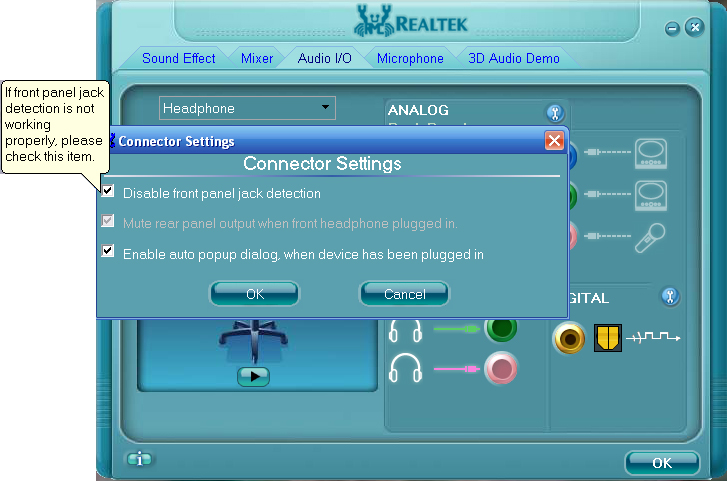
2. Select the Audio I/O tab towards the top of the Realtek window 3. Click the small wrench next to "ANALOG" 4. Select "Disable front panel jack detection"
I know it sounds weird to disable the detection, that's what I thought.
Click to enlarge
After doing that, try a few different settings, such as speaker/headphone for the jack you think or know you have your speaker or microphone plugged in to, make sure the front ports are turned all the way up in the mixer and not muted... Make sure your normal audio controller (the one standard with windows) doesn't have anything muted.
Information that may be of help to some people:
My audio configuration as of this article date:
Realtek Audio Driver Version 5.10.00.5345
DirectX Version: DirectX 9.0c
Audio Controller: HD Audio
Audio Codec ALC883
Language Auto
Computer Hardware: Motherboard: ECS KN3 SLI2 Extreme (came with the Realtek audio system) Computer Case with Front Audio Ports: NZXT LEXA-NP
I searched on and off getting frustrated for around 6 months to find this simple bit of information. I hope this has helped you solve your problem!
#1AeL August 28, 2008 @ 2:36 AM
Thank you very much, this worked as you said!
#2Chexed September 05, 2008 @ 6:38 PM
You're quite welcome! I'm happy I could help!
#3Forgetful July 19, 2009 @ 3:04 AM
Some three years ago I spent hours to find
"Disable fpj detection" = "enable fpj".
Recently again I spent more hours to no avail. Thank you for reminding, should've kept a note at the first place.
#4Chexed July 19, 2009 @ 2:42 PM
No problem, Forgetful. It took me quite a while to figure out the problem at first then just as long to figure out the solution since I couldn't find Realtek's documentation on front ports not working.
#5a person with a problem February 15, 2010 @ 8:25 PM
I did what you typed and when I clicked the wrench, the only option that came up in the screen was "Enable auto popup dialog, when device has been plugged in"
When I plug in my headphones, Realtek comes up and I hit OK and OK, but the sound still comes thru on the computer, not the headphones. I know the headphones work fine. Help...
#6ishfaaq October 22, 2010 @ 7:28 AM
it does not work 4 me.